For each message in the overview, you can view details, for example, to identify the erroneous elements for the status RJCT. The details contain, for example, payment data and information on message codes.
|
The details show only data that is included in the status report and data that could have been completed by the application based on a possibly available order file. If a status report does not contain any data and the order file was not sent via the application, many fields may be empty – except for the IDs of the respective levels. |

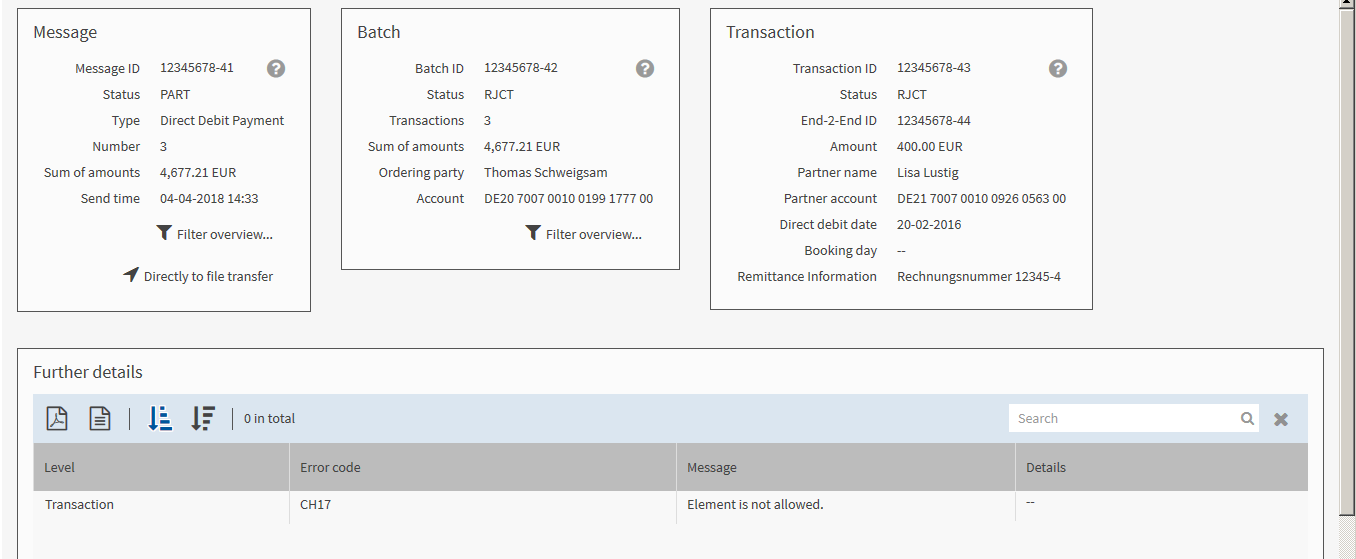
The mask is divided into three areas:
The example in the mask shows a rejected transaction 12345678-53 from the batch 12345678-52, which is partly rejected as not all transactions it contains are erroneous. The superordinate message 12345678-51 is also partly rejected. The error code indicates that an included element is not valid.
|
If the bank system provides further details on the error code, they are displayed in the column Details. The data can facilitate your error search. |