Export of account statements and transactions in SAP format MultiCash

 
Explanation

You can export account statements as well as booked lines for single accounts or for all accounts collectively.

This export generates files in MultiCash format, which can be imported into SAP systems. The file names auszug.txt and umsatz.txt are predefined by SAP.

You can only export already booked lines. You cannot export interim transaction reports.

Procedure for exporting account statements or transactions

1.

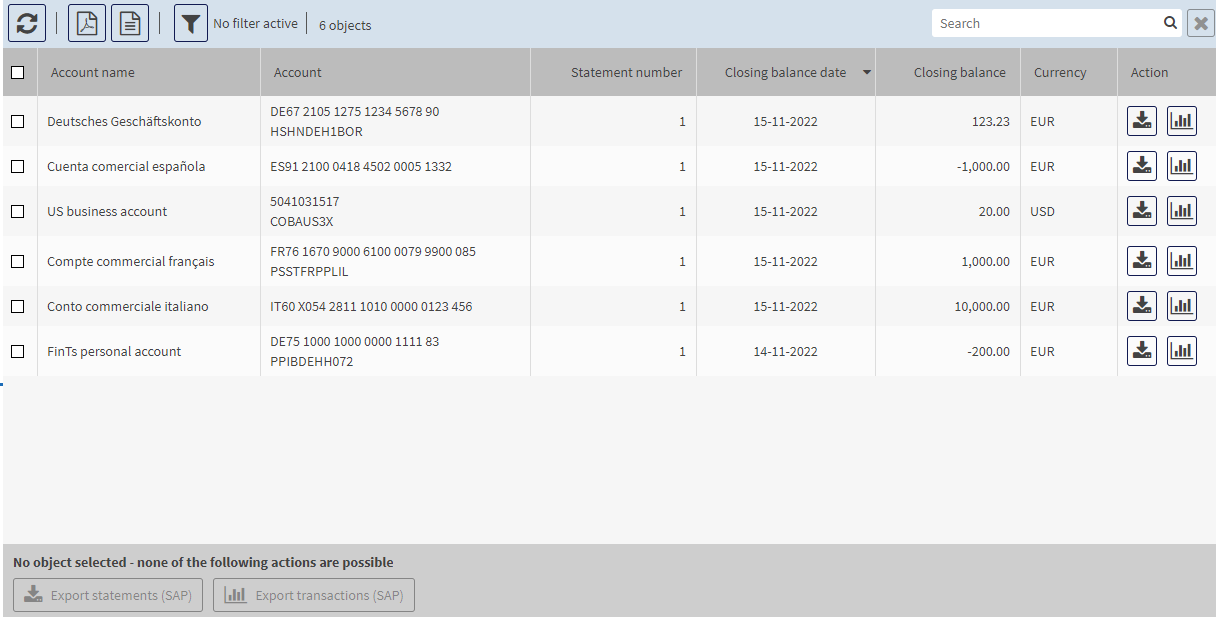
Select Account information ➔ Export.

The export mask, in which all downloaded account statements are displayed, opens.


The displayed statements are sorted by the date of the closing balance. The most recent statement is displayed at the top of the list.

2.

Select the desired export function using the following buttons:

Button

Action

Exports the statement

Exports the booked lines of the selected statement

Export statements (SAP)

Exports the selected statements

Export transactions (SAP)

Exports the booked lines of the selected statements

3.

Select whether you wish to open or save the file.

Statements are saved in your download folder in a file called auszug.txt.

Transactions are saved in your download folder in a file called umsatz.txt.